> For the complete documentation index, see [llms.txt](https://docs.ducks-services.com/llms.txt). Markdown versions of documentation pages are available by appending `.md` to page URLs; this page is available as [Markdown](https://docs.ducks-services.com/select-your-product/select-your-game/rust/rust-stealth.md).
# Rust Stealth
{% embed url="" %}
{% embed url="" %}
***
{% stepper %}
{% step %}
### Download the Loader
Download Full LoaderDownload Lite Loader
{% endstep %}
{% step %}
### Check Windows Version
* Ensure you are running **Windows 10 (21H1+) or Windows 11**.
* You can check this by searching **winver**.
{% endstep %}
{% step %}
### Check CPU Support
* Your **Intel or AMD CPU must support AVX instructions**.
* Use **CPU-Z** to verify AVX support.
{% endstep %}
{% step %}
### Verify BIOS Mode
* Your system must be using **UEFI BIOS mode**.
* Check this by opening **msinfo32** and confirming **BIOS Mode = UEFI**.
{% endstep %}
{% step %}
### Close Game
* Make sure the **game and any launchers are fully closed** before starting.
{% endstep %}
{% step %}
### Download Loader
* Download and run the **product downloader / bootloader**.
{% endstep %}
{% step %}
### Run Loader
* Launch the loader (**Administrator privileges are required**).
{% endstep %}
{% step %}
### Enter Key
* Enter your **license key** and click **Activate**.
{% endstep %}
{% step %}
### Start Product
* Click **Run** to begin the startup process.
{% endstep %}
{% step %}
### System Reboot
* Your **PC will automatically restart** during the loading process.
{% endstep %}
{% step %}
### Launch Game
* After you reach the desktop, **start Rust**.
{% endstep %}
{% step %}
### Load Menu
* Within about **one minute**, the **product menu should appear**.
{% endstep %}
{% step %}
### Open Menu
* Press **HOME** to open or close the menu.
{% endstep %}
{% step %}
### Unload Cheat
* Press **END** to unload the product (requires restart to load again).
{% endstep %}
{% step %}
### Lite Version Controls
The **Lite version has no menu** and is controlled by hotkeys:
* **F5** – Toggle chams
* **F6** – Bright night
* **F9** – Camera flight
{% endstep %}
{% endstepper %}
🛠️ Troubleshooting
#### Errors when trying to open the loader
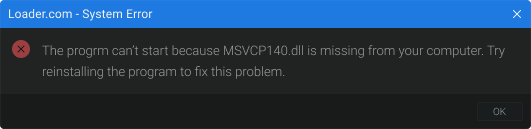
**System Error**
This image is an example and may vary!
This error means that you are missing Microsoft Visual C++ base libraries
{% hint style="success" %}
Microsoft Visual C++ libraries must be installed
{% endhint %}
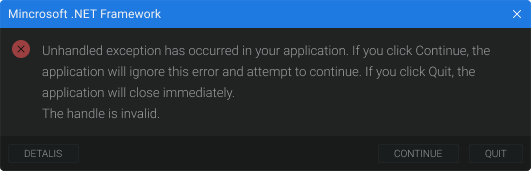
\#### Error .Net Framework
This image is an example and may vary!
This error means that you are missing the .Net Framework base libraries
{% hint style="success" %}
You need to install the .Net Framework libraries
{% endhint %}
\*\*\*
#### Errors during authorisation
**Old Windows! Need Win10 21H1 b19043**
This error means that you do not have the correct Windows or version.
{% hint style="success" %}
A suitable Windows and version must be installed
{% endhint %}
{% hint style="info" %}
You can find a list of suitable Windows and versions [here](https://stealth-3.gitbook.io/docs/problem/broken-reference)
{% endhint %}
{% hint style="info" %}
Instructions for installing Windows can be found [here](https://stealth-3.gitbook.io/docs/problem/broken-reference)
{% endhint %}
\#### TPM Enabled!
This error means that you have Trusted Platform Module (TMP) enabled
{% hint style="success" %}
You need to disable Trusted Platform Module (TMP) in the system bios
{% endhint %}
**Video instruction on how to disable TMP**
The video author's bios interface may be different from yours. To make your search easier, use the search engine to find a solution for your motherboard model
**No VMX support!**
This error means that you have Virtualisation Technology (VMX) turned off
{% hint style="success" %}
You need to enable Virtualisation Technology (VMX) in the system bios
{% endhint %}
**Video tutorial on how to enable Virtualisation Technology (VMX)**
The video author's bios interface may be different from yours. To make your search easier, use the search engine to find a solution for your motherboard model
**No AVX support!**
This error means that you have a broken or unsupported AVX processor instruction
{% hint style="success" %}
Need to replace the processor with an Intel from 5th generation with AVX support.
{% endhint %}
{% hint style="info" %}
You can find out if your processor supports avx [here](https://en.wikipedia.org/wiki/Intel_Core#11th_generation)
{% endhint %}
\#### Legacy BIOS Mode!
This error means that you have Legacy bios mode
{% hint style="success" %}
You need to change the bios mode from Legacy to UEFI
{% endhint %}
**Microsoft's official manual**
**Video tutorial on how to change bios mode from Legacy to UEFI**
The video author's bios interface may be different from yours. To make your search easier, use the search engine to find a solution for your motherboard model
**UEFI SecureBoot ENABLED!**
This error means that you have SecureBoot enabled
{% hint style="success" %}
You need to disable SecureBoot in the system bios
{% endhint %}
**Video tutorial on how to disable SecureBoot**
The video author's bios interface may be different from yours. To make your search easier, use the search engine to find a solution for your motherboard model
**Error: Connect to server**
This error means that you have a poor connection to the product servers or no connection at all
{% hint style="success" %}
Must use a VPN when launching the product, also the product may not work or be temporarily unavailable, check the newsfeed or contact the seller
{% endhint %}
\#### Frozen product!
This error means that the product is temporarily unavailable or frozen for update
{% hint style="success" %}
Check the news feed or contact the seller
{% endhint %}
\#### Wrong game key!
This error means that you are using the wrong loader from another game of our product.
{% hint style="info" %}
Each product has its own loader
{% endhint %}
{% hint style="success" %}
Use the required loader
{% endhint %}
\#### Key has expired!
This error means that your key has expired
{% hint style="success" %}
A new key must be used
{% endhint %}
\#### Bad HWID!
This error means that the binding of the product to your computer has broken. This can happen for many reasons, from using a spoofer to changing the hardware or components of your computer.
{% hint style="success" %}
You need to contact the seller to reset the binding
{% endhint %}
{% hint style="warning" %}
The product can be used only for 1 computer! Activation of the product after resetting the binding on another computer from another city will result in blocking of the key.
{% endhint %}
\#### Bad res data!
This error means that you have a poor connection to the product servers or no connection at all
{% hint style="success" %}
Must use a VPN when launching the product, also the product may not work or be temporarily unavailable, check the newsfeed or contact the seller
{% endhint %}
\*\*\*
#### Launch errors
**Get boot part desc failed! -> 1**
This error means that your boot partition is broken or not working properly!
{% hint style="success" %}
It is necessary to reinstall Windows, as it is not possible to solve this problem on your own
{% endhint %}
{% hint style="info" %}
You can find a list of suitable Windows and versions [here](https://stealth-3.gitbook.io/docs/problem/broken-reference)
{% endhint %}
{% hint style="info" %}
Instructions for installing Windows can be found [here](https://stealth-3.gitbook.io/docs/problem/broken-reference)
{% endhint %}
\#### Boot part not GPT! -> 2
This error means that you have an MRB boot partition
{% hint style="success" %}
Need to change boot partition from MRB to GPT
{% endhint %}
**Video tutorial on how to change boot partition from MRB to GPT**
The video author's bios interface may be different from yours. To make your search easier, use the search engine to find a solution for your motherboard model
**Boot part wrong FS! -> 3**
This error means that your boot partition is broken or not working properly!
{% hint style="success" %}
It is necessary to reinstall Windows, as it is not possible to solve this problem on your own
{% endhint %}
{% hint style="info" %}
You can find a list of suitable Windows and versions [here](https://stealth-3.gitbook.io/docs/problem/broken-reference)
{% endhint %}
{% hint style="info" %}
Instructions for installing Windows can be found [here](https://stealth-3.gitbook.io/docs/problem/broken-reference)
{% endhint %}
\#### Get boot part MP failed! -> 4
This error means that your boot partition is broken or not working properly!
{% hint style="success" %}
It is necessary to reinstall Windows, as it is not possible to solve this problem on your own
{% endhint %}
{% hint style="info" %}
You can find a list of suitable Windows and versions [here](https://stealth-3.gitbook.io/docs/problem/broken-reference)
{% endhint %}
{% hint style="info" %}
Instructions for installing Windows can be found [here](https://stealth-3.gitbook.io/docs/problem/broken-reference)
{% endhint %}
\#### Get boot part desc failed! -> 5
This error means that your boot partition is broken or not working properly!
{% hint style="success" %}
It is necessary to reinstall Windows, as it is not possible to solve this problem on your own
{% endhint %}
{% hint style="info" %}
You can find a list of suitable Windows and versions [here](https://stealth-3.gitbook.io/docs/problem/broken-reference)
{% endhint %}
{% hint style="info" %}
Instructions for installing Windows can be found [here](https://stealth-3.gitbook.io/docs/problem/broken-reference)
{% endhint %}
\#### Wrong boot part size! -> 6
This error means that your boot partition is broken or not working properly!
{% hint style="success" %}
It is necessary to reinstall Windows, as it is not possible to solve this problem on your own
{% endhint %}
{% hint style="info" %}
You can find a list of suitable Windows and versions [here](https://stealth-3.gitbook.io/docs/problem/broken-reference)
{% endhint %}
{% hint style="info" %}
Instructions for installing Windows can be found [here](https://stealth-3.gitbook.io/docs/problem/broken-reference)
{% endhint %}
\#### Get boot part MP failed! -> 7
This error means that your boot partition is broken or not working properly!
{% hint style="success" %}
It is necessary to reinstall Windows, as it is not possible to solve this problem on your own
{% endhint %}
{% hint style="info" %}
You can find a list of suitable Windows and versions [here](https://stealth-3.gitbook.io/docs/problem/broken-reference)
{% endhint %}
{% hint style="info" %}
Instructions for installing Windows can be found [here](https://stealth-3.gitbook.io/docs/problem/broken-reference)
{% endhint %}
\#### Error: hvix64/hvax64 not found! -> 7h
This error means that you don't have enough Windows hvix64 files if it's intel, hvax64 if it's amd
{% hint style="success" %}
It is necessary to restore Windows system files using the commands below
{% endhint %}
Open the command prompt as an administrator and enter this command
cpp sfc /scannow
We wait until the end of the download, then enter the following command
\`\`\`cpp dism /online /cleanup-image /restorehealthAfter downloading, the PC restarts and we launch the product according to the instructions
---
# Agent Instructions
This documentation is published with GitBook. GitBook is the documentation platform designed so that both humans and AI agents can read, navigate, and reason over technical content effectively. Learn more at gitbook.com.
## Querying This Documentation
If you need additional information that is not directly available in this page, you can query the documentation by asking a question.
Perform an HTTP GET request on the following URL with the `ask` and `goal` query parameters:
```
GET https://docs.ducks-services.com/select-your-product/select-your-game/rust/rust-stealth.md?ask=&goal=
```
`ask` is the immediate question: it should be specific, self-contained, and written in natural language.
`goal` is what the user is ultimately trying to achieve, the reason they need the answer. Sharing it helps GitBook give you a better, more relevant answer. A goal is most helpful when it describes the outcome the user wants rather than restating the question. For example, with `ask=how do I create an API token`, a goal like `automate deployments from our CI pipeline` lets GitBook tailor the answer to that use case.
The response will contain a direct answer to the question and relevant excerpts and sources from the documentation.
Use this mechanism when the answer is not explicitly present in the current page, you need clarification or additional context, or you want to retrieve related documentation sections.